
Last Updated on October 4, 2026 by Sam Thompson
Stretching is no longer something associated only with yoga studios, athletes or post-workout cooldowns. For millions of people, the bigger problem is simply not moving enough during the day. Remote workers can spend hours at a laptop with very few natural opportunities to stand up, walk between meetings or change position. Over time, that sedentary routine can leave the neck, shoulders, hips, hamstrings and lower back feeling tight and uncomfortable.
A well-designed stretching app can help by turning movement into a repeatable part of the day. But different platforms take very different approaches. Some prioritise short everyday routines, some focus on flexibility goals, and others are built around athletic mobility and recovery.
This guide compares five options, looking beyond feature lists to consider who each platform is actually useful for, how easy it is to build a routine around, and where each one fits into a modern, increasingly sedentary lifestyle.
Best Stretching App Options at a Glance
- StretchBreak — The strongest all-round option for everyday stretching, mobility, flexibility and posture, particularly for people who spend long hours sitting.
- Bend — A simple, approachable platform built around making daily stretching into a habit.
- STRETCHIT — A more specialised option for people who want structured flexibility training and measurable goals.
- pliability — A comprehensive mobility and recovery platform that suits active people as well as desk-bound users.
- GOWOD — An assessment-led mobility platform designed particularly around sports and athletic performance.
Best Stretching Apps Comparison
| Product | Best For | Key Features | Price | Rating |
|---|---|---|---|---|
| StretchBreak | Everyday stretching, mobility, flexibility and posture; particularly useful for people who spend long hours sitting | Targeted routines, posture work, reminders, streaks, StretchScore, custom routines | $5.99/month or $29.99/year | 5/5 |
| Bend | Beginners and daily stretching | Hundreds of exercises, guided routines, reminders, streaks, analytics, custom routines | Pricing varies by offer | 4.5/5 |
| STRETCHIT | Dedicated flexibility training and specific goals | Splits and backbend programmes, 5–45 minute classes, personalised programmes, video guidance | $24.99/month or $179.99/year | 4.5/5 |
| pliability | Mobility, recovery and active lifestyles | 1,700+ guided sessions, Mobility Test, personalised programmes, recovery routines | $22.95/month or $199.95/year | 4.5/5 |
| GOWOD | Athletes and sport-specific mobility | Mobility assessment, personalised programmes, sport-specific routines, progress tracking | Pricing varies by plan and region | 4/5 |
Best Stretching Apps: In-Depth Reviews
The five apps take different approaches to stretching, flexibility and mobility. The following reviews look at each platform in more detail, including its main features, intended users, pricing, strengths and limitations.
StretchBreak
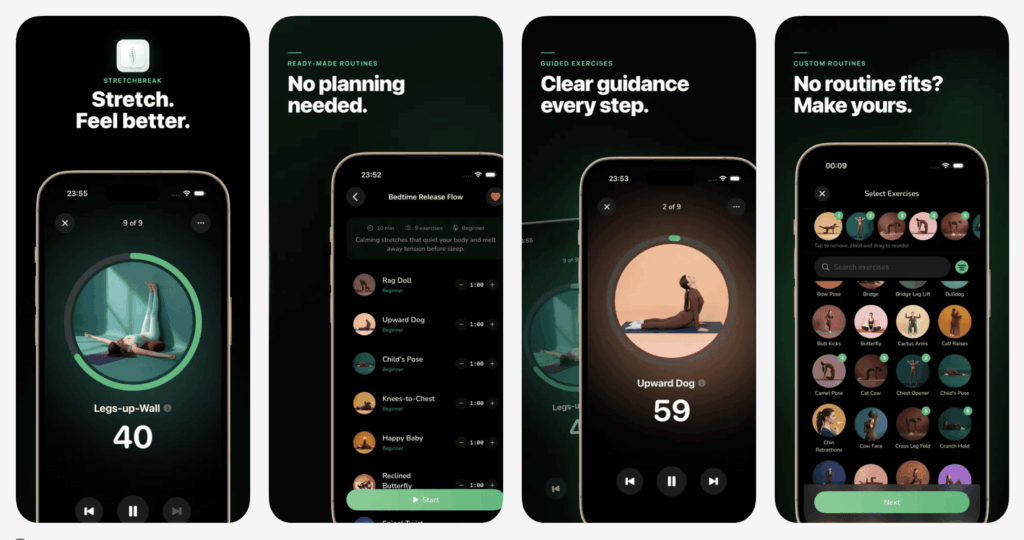
StretchBreak stands out as the strongest overall option because it approaches stretching as something people can incorporate into ordinary life, rather than treating it exclusively as a fitness activity.
That distinction is particularly relevant in 2026, when remote and hybrid working have made prolonged sitting a normal part of many people’s days. Someone can exercise several times a week and still spend eight or more hours sitting at a computer. The resulting lack of movement can leave the hips, hamstrings, shoulders, neck and lower back feeling stiff even when the person is otherwise reasonably active.
StretchBreak has routines specifically suited to this type of use. Its App Store listing describes a library containing hundreds of stretches and yoga poses, alongside dozens of routines. These include Wake Up, Posture Reset, Full Body, Sleep, Hip Opener, Hamstrings, Lower Back and Isometric sessions.
The Posture Reset routine is specifically designed around seated stretches for the shoulders, back and neck, while the Hip Opener routine is aimed at the effects of spending extended periods sitting.
That makes the app relevant to a problem that is easy to overlook: a lack of movement during working hours. The aim does not have to be becoming exceptionally flexible. It can simply be getting out of the chair and giving the body a different movement stimulus several times during the day.
| Feature | StretchBreak |
|---|---|
| Best For | Everyday stretching, mobility, flexibility and posture |
| Key Features | Targeted routines, posture work, reminders, streaks, StretchScore and custom routines |
| Remote Worker Focus | Short movement breaks, neck and shoulder work, hip mobility, lower-back routines and posture-focused sessions |
| Price | $5.99/month or $29.99/year |
| Rating | 5/5 |
Another advantage is customisation. Users can combine exercises from the library to create a routine around their own needs rather than having to follow a fixed sequence every time. The app also includes a StretchScore intended to give users a quick view of their recent consistency.
The presentation is deliberately less intimidating than a specialist flexibility programme. Someone who has never stretched regularly can start with a short routine, while a more experienced user can select individual areas or build a more comprehensive session.
For people searching for an app for stretching that can work around an ordinary working day, this broad positioning is what gives StretchBreak its advantage. It is not trying to turn every user into an athlete. Instead, it addresses one of the most common barriers to movement: people simply spend too much of their day sitting.
Its price also places it at the relatively accessible end of this comparison, particularly on the annual plan. Combined with its broad range of routines and habit-focused features, that supports the overall 5/5 rating.
Bend
Bend takes one of the simplest approaches among the five platforms. Its core proposition is to make stretching and movement easy enough to become part of a daily routine, rather than turning the activity into another complicated training commitment.
The app offers hundreds of stretches and yoga poses, along with routines intended for different experience levels. Its feature set also includes illustrations, videos, reminders, streaks, progress analytics and the ability to create custom routines.
This makes Bend particularly appealing to beginners. A person who searches for Stretching Apps may already know that they need to move more but have little idea where to start. A huge library can actually make that problem worse if the user has to spend ten minutes deciding what to do before beginning.
Bend’s relatively straightforward structure reduces that friction. It is designed around short, convenient routines, which makes it easier to think of stretching as a daily activity rather than a separate workout.
| Feature | Bend |
|---|---|
| Best For | Beginners and people building a daily stretching habit |
| Key Features | Hundreds of exercises, guided routines, reminders, streaks, analytics and custom routines |
| Training Style | Accessible, routine-based stretching with an emphasis on consistency |
| Price | Pricing varies by offer |
| Rating | 4.5/5 |
The current App Store listing also shows that Bend supports a broad range of languages and Apple devices. Pricing varies by offer, with several monthly and annual options listed in the UK store, so users should check the current in-app pricing rather than relying on a fixed third-party figure.
Bend’s main strength is therefore not specialist mobility science or ambitious flexibility programmes. It is accessibility. For someone who wants to start stretching every day without making the process complicated, that can be exactly what is needed.
Compared with StretchBreak, Bend has a similar emphasis on everyday consistency. StretchBreak, however, places more emphasis on targeted areas such as desk-related stiffness, posture and specific body-region routines, giving it a slightly broader use case for people whose main problem is prolonged sitting.
Its 4.5/5 rating reflects the combination of accessibility, habit-building features and straightforward presentation, while the variable subscription structure means users should assess the current offer against how frequently they expect to use the app.
STRETCHIT
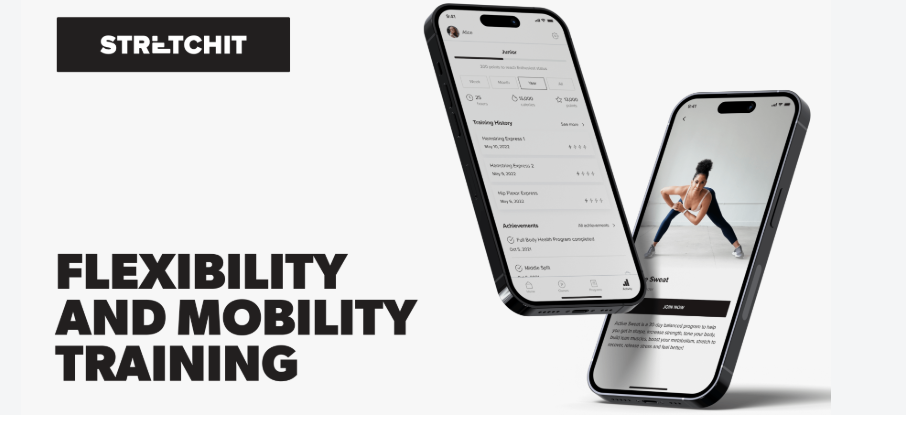
STRETCHIT takes flexibility much more seriously as a structured training objective. Rather than positioning stretching simply as a daily wellness habit, it offers programmes designed around specific outcomes, including front, middle and standing splits and backbends.
That makes it one of the more interesting options for users who have a clear physical goal. Someone who wants to touch their toes more comfortably may not need a specialised programme, but someone working towards a split needs a different kind of progression.
The app provides more than 100 hours of video instruction, with classes ranging from five to 45 minutes, and new classes are released regularly. Its programme system includes personalised programmes, curated 7- to 90-day programmes, personal recommendations and a Daily Stretch section.
The recommendation system is also more sophisticated than simply choosing a random routine. STRETCHIT can take the user’s goals, level and preferences into account and recommend classes accordingly. Users can also create their own programmes, selecting duration, intensity and trainers.
| Feature | STRETCHIT |
|---|---|
| Best For | Dedicated flexibility training and specific flexibility goals |
| Key Features | Splits and backbend programmes, 5–45 minute classes, personalised programmes and video guidance |
| Training Style | Structured classes designed around flexibility progression and specific movement goals |
| Price | $24.99/month or $179.99/year |
| Rating | 4.5/5 |
The platform is also deliberately broad in terms of ability. Its current listing mentions users ranging from people who have never stretched before to dancers, gymnasts, martial artists, runners, cyclists, bodybuilders, yogis and desk workers.
For a user who wants a dedicated flexibility programme, this depth is a major advantage. There is enough structure to create a genuine training plan rather than simply accumulating random stretches.
The trade-off is that STRETCHIT may be more than a casual user needs. Someone searching for flexibility apps because their lower back feels stiff after sitting all day may prefer shorter, less goal-oriented routines. For a specific flexibility project, however, STRETCHIT is one of the more developed options in this comparison.
The 4.5/5 rating reflects that specialisation. At $24.99 per month or $179.99 annually, it is also positioned at a significantly higher price point than some general-purpose stretching platforms, making the value proposition more compelling for users who will actually use its structured flexibility programmes.
pliability
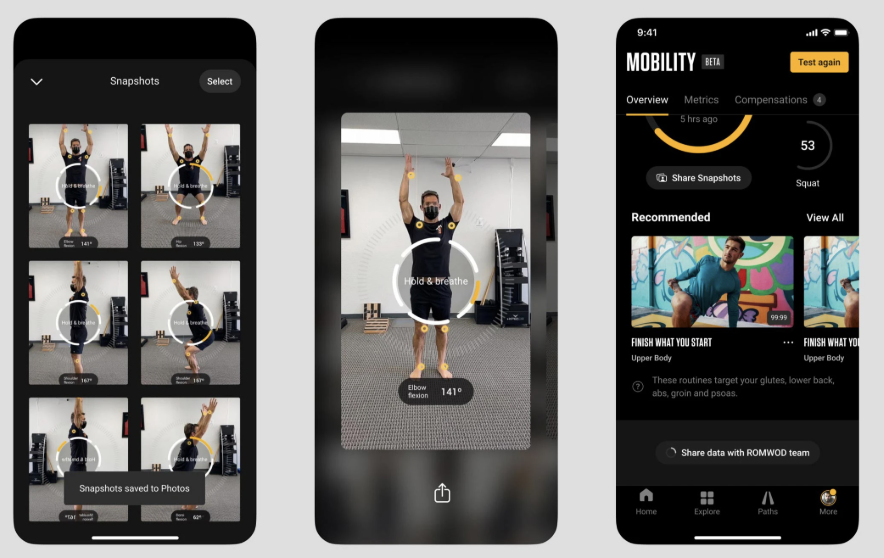
pliability occupies a slightly different position because mobility and recovery sit at the centre of its offering. Rather than treating flexibility as the sole objective, it focuses on helping users move joints through a usable range of motion while combining mobility work with recovery.
The platform currently describes more than 2,000 routines, while its App Store listing highlights more than 1,700 guided mobility and recovery sessions. Many daily routines are designed to take roughly 12–20 minutes, with targeted sessions for areas including the hips, back, shoulders, hamstrings and neck.
The difference between flexibility and mobility is important here. Flexibility broadly concerns how far a muscle or joint can be moved, while mobility also involves the ability to actively control that movement. Someone can have a reasonable passive range of motion without necessarily having strong or controlled movement through that range.
pliability’s approach is therefore particularly useful for people who exercise regularly. Its routines can be used around running, strength training, functional fitness and other activities, but the platform also explicitly positions mobility as relevant to people who spend much of the day sitting.
| Feature | pliability |
|---|---|
| Best For | Mobility, recovery and active lifestyles |
| Key Features | 1,700+ guided sessions, Mobility Test, personalised programmes and recovery routines |
| Training Style | Mobility and recovery sessions designed to complement active training |
| Price | $22.95/month or $199.95/year |
| Rating | 4.5/5 |
One particularly useful feature is the ability to build routines around specific constraints. pliability’s current service describes filters and custom programmes based on goals and available time, while its Mobility Test provides a more structured way to assess active range of motion.
For someone comparing options for the Best mobility app, pliability deserves serious consideration because mobility is its central concept rather than an additional category alongside stretching.
Its broad scope can also be a strength for people who want one platform that covers warm-ups, recovery and everyday mobility. For someone who simply wants a five-minute stretch between video calls, however, a more straightforward platform may feel more appropriate.
At $22.95 per month or $199.95 annually, pliability is one of the more premium-priced platforms in the comparison. Its 4.5/5 rating reflects the breadth of its mobility and recovery ecosystem rather than its suitability for every type of casual stretching user.
GOWOD
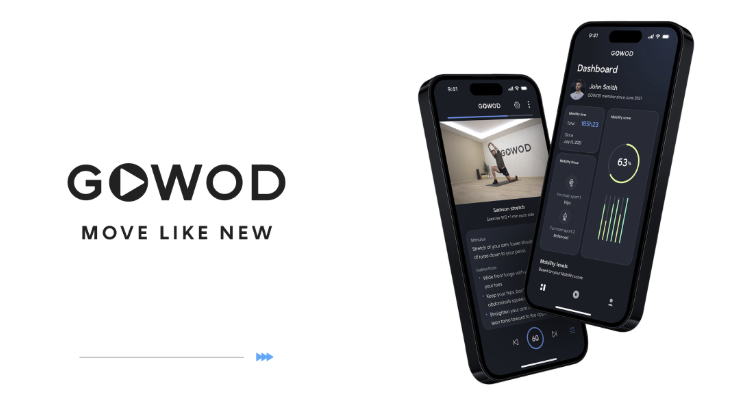
GOWOD is the most assessment-driven option in the comparison. Its approach starts with identifying mobility characteristics rather than simply presenting every user with the same programme.
The platform uses a mobility test to produce a mobility score and then creates a personalised programme based on the user’s sport and areas of weakness. Its current website describes routines that can be adapted for training at home, outdoors or in a gym, with progress tracking to monitor changes over time.
This makes GOWOD especially interesting for athletes who already understand why mobility matters to their particular activity. A runner, weightlifter or functional-fitness athlete may have very different movement requirements from a person who spends most of the day working at a desk.
| Feature | GOWOD |
|---|---|
| Best For | Athletes and people looking for sport-specific mobility training |
| Key Features | Mobility assessment, personalised programmes, sport-specific routines and progress tracking |
| Training Style | Assessment-led mobility work tailored around movement needs and sporting activity |
| Price | Pricing varies by plan and region |
| Rating | 4/5 |
The benefit of this model is specificity. Rather than asking the user to decide which stretches might be useful, GOWOD attempts to use an assessment as the starting point.
That can be particularly valuable when mobility is directly connected to training performance. At the same time, it means the platform is arguably more specialised than someone needs if their main objective is simply to counteract a sedentary workday.
GOWOD therefore sits at the athletic end of this list. It is a compelling option for someone who wants mobility integrated into a broader training strategy, while StretchBreak has the stronger case for general everyday use.
The 4/5 rating reflects the platform’s strong personalisation and sport-specific orientation, balanced against the fact that its assessment-led approach is not necessarily necessary for someone looking for straightforward daily stretching.
Best Stretching Apps for Different Goals
The five platforms become easier to understand when the category is divided according to what the user actually wants to achieve.
A person who simply wants to move more during the working day has a different requirement from someone training for a split. Likewise, an athlete looking for mobility work around training may benefit from a very different structure from a complete beginner.
The most useful distinction is therefore not which app has the longest feature list, but which approach matches the user’s actual objective.
Best Mobility App Features and Use Cases
One of the easiest mistakes when comparing these products is treating stretching and mobility as interchangeable terms.
They overlap, but they are not exactly the same. Stretching commonly involves deliberately lengthening muscles or moving into a stretch position. Mobility has a broader meaning and includes the ability to actively control movement through a range of motion.
That distinction becomes more important depending on the user’s goal.
Someone who sits at a computer all day may want a mixture of gentle stretching and movement that targets the hips, upper back, neck and shoulders. A weightlifter may need mobility exercises that help them control positions under load. A dancer may be primarily concerned with increasing flexibility.
This is why the Best mobility app for an athlete does not automatically become the best option for a remote worker. The right platform should match the actual problem the user is trying to solve.
pliability and GOWOD place mobility at the centre of their platforms, while StretchBreak combines mobility with broader everyday stretching and posture-focused routines.
Stretching Apps for Remote Workers
The modern desk job creates a particular movement problem. It is possible to have a physically active lifestyle outside working hours while still spending the majority of the day almost completely sedentary.
Remote work can intensify that pattern. There may be no walk to the office, no journey between meeting rooms and no reason to leave the chair between calls. A person can move from breakfast to laptop to lunch at the same desk and only realise at the end of the afternoon that they have barely changed position.
This is where Stretching Apps can be more useful than they initially appear.
The goal does not necessarily need to be “getting fit”. A five- or ten-minute movement break can simply interrupt a long period of sitting. Over a working day, several short breaks can be more realistic than expecting someone to complete a lengthy workout.
StretchBreak is particularly well aligned with this use case because its routines include areas commonly associated with desk-based stiffness. Its Posture Reset routine focuses on the neck, shoulders and back, while Hip Opener and Lower Back routines address other areas that can become uncomfortable after prolonged sitting.
This is also why a good stretching platform should not be judged purely by the number of exercises in its library. For a remote worker, the practical question is whether the app makes movement easy to remember and easy to fit around work.
Posture Apps and Desk-Based Movement
Searches for posture app and posture apps often reflect a desire for a simple solution to discomfort associated with desk work. But posture is more complicated than finding a single “correct” sitting position and maintaining it all day.
The body is designed to move. Staying in one position for hours can be uncomfortable even when the position itself is not objectively bad. For desk workers, changing position, standing up, walking around and moving the spine, hips and shoulders can be more useful than trying to hold a rigid posture indefinitely.
This is where posture-oriented stretching routines can play a useful role. A routine can act as a prompt to stop working for a few minutes and move areas that have remained relatively static.
StretchBreak’s Posture Reset concept is particularly relevant because it is built around seated stretches for the shoulders, back and neck rather than requiring a complete change of workout clothes or a dedicated fitness session.
The same principle applies to other apps. A posture routine should be viewed as one component of a broader strategy that includes a sensible workstation, regular movement and variation in position.
Flexibility Apps and Goal-Based Training
General stretching and flexibility training serve different purposes.
If someone simply wants to feel less stiff, a selection of short routines may be enough. But when the objective is a front split, middle split, backbend or substantially greater range of motion, structured progression becomes much more important.
This is where STRETCHIT has an obvious advantage. Its programmes are designed around specific flexibility outcomes and can be organised into longer-term training plans.
That does not make a specialised programme automatically better for everyone. In fact, choosing an advanced flexibility platform when the real problem is simply sitting for eight hours a day could create unnecessary complexity.
Before choosing between flexibility apps, identify whether flexibility is the goal itself or simply one part of wanting to move more comfortably. A general flexibility app can be enough for maintaining range of motion, while a specialised programme is more appropriate when there is a clearly defined training objective.
How to Choose the Best Stretching App
The most useful stretching platform is not necessarily the one with the largest exercise library. The more important question is whether it solves the reason you want to stretch in the first place.
For a remote worker, for example, the priority may be breaking up long periods of sitting and targeting stiff hips, shoulders, neck and lower back. Someone training for a marathon may be more interested in recovery and mobility around running. A dancer may need a much more structured flexibility programme, while a complete beginner may simply need short sessions that are easy to understand.
There are several factors worth considering before choosing between the five platforms.
Routine length matters. A 10-minute routine that fits naturally between meetings can be more useful than a 45-minute programme that is difficult to schedule.
Specificity matters too. If you have a particular goal, such as improving your splits or overhead mobility, a platform with targeted programmes can offer more value than a general stretching library.
Instructions are important. Stretching is not simply a matter of copying a position. Clear demonstrations, timing, guidance and cautions can make a routine easier and safer to follow.
Consistency is arguably the biggest factor. Reminders, streaks, progress tracking and personalised routines can all help turn occasional stretching into an actual habit.
Finally, consider whether you want stretching to be the main activity or whether you are looking for something broader. The distinction between a stretching app and a mobility platform becomes increasingly important once you move beyond basic flexibility.
Consistency and Habit Building
There is an important difference between having access to good exercises and actually performing them.
Most people do not need thousands of stretches. They need a small selection of movements they understand, can perform comfortably and will remember to do.
This is why features such as reminders, streaks, progress indicators and custom routines are more significant than they might initially seem. They address the behavioural side of stretching.
For example, someone might know that their hips feel tight after sitting but still spend an entire afternoon working without taking a break. A reminder creates an interruption. A short routine removes the need to decide what to do. A progress feature gives the user a reason to return tomorrow.
The best stretching app is therefore not necessarily the one with the most sophisticated technical features. It is the one that reduces enough friction for stretching to become habitual.
App for Stretching Guidance and Exercise Quality
An app for stretching should also make the exercises understandable.
A stretching routine can be difficult to follow if the user does not know where their body should be positioned or how long they should hold a movement.
This is particularly important for beginners. A written list saying “hip flexor stretch” is considerably less useful than a clear demonstration accompanied by timing and practical instructions.
The five platforms take different approaches. StretchBreak uses custom illustrations, instructions, timers and cautions, while Bend combines illustrations and videos with guided routines. STRETCHIT relies heavily on video instruction, and pliability and GOWOD use guided routines designed around mobility and training contexts.
The ideal format ultimately depends on the user. Some people prefer following a video from start to finish. Others want to glance at an illustration, start a timer and complete a stretch independently.
Pricing and Subscription Considerations
Subscription pricing can change, promotional offers can vary by region and App Store listings may show multiple purchase options. That makes it risky to compare platforms using a single headline price found in an old review.
StretchBreak currently lists $5.99 per month or $29.99 per year in the US App Store. STRETCHIT lists $24.99 per month or $179.99 per year on its website, while pliability lists $22.95 per month or $199.95 per year. Bend and GOWOD use pricing structures where available offers can vary by platform, region or subscription option.
The more useful question is therefore not simply “Which app is cheapest?” but “Will I use the features I am paying for?”
A remote worker who only needs several short movement sessions a week may not need the same subscription as an athlete who wants personalised mobility programming, progress testing and sport-specific routines.
Annual plans can make sense for users who already know they will use an app consistently, while monthly pricing can be more appropriate when someone is still determining whether a particular approach fits their routine.
Best Stretching Apps by User Type
The choice becomes much clearer when the apps are viewed through specific user needs.
For remote workers: StretchBreak is the most natural fit because of its combination of desk-relevant routines, posture work, hip-focused stretching and habit features. Bend is another straightforward option for users who primarily want reminders and consistency.
For beginners: Bend and StretchBreak are the easiest starting points because neither requires a highly specialised flexibility goal.
For dedicated flexibility training: STRETCHIT is particularly suited to users whose programmes are explicitly built around flexibility development and specific outcomes.
For athletes and active users: pliability provides a broad combination of mobility, recovery and targeted routines, while GOWOD goes further into sport-specific personalisation.
For people primarily interested in mobility: pliability and GOWOD have the strongest mobility-first approaches, although StretchBreak also covers mobility as part of its broader everyday stretching focus.
The Right Choice Depends on the Problem
The five platforms are not really competing for exactly the same user.
StretchBreak is strongest when the objective is to make movement a normal part of everyday life. Bend is similarly habit-focused but deliberately simple. STRETCHIT treats flexibility as a training objective. pliability connects mobility with recovery and active lifestyles. GOWOD takes the most assessment-driven and sport-specific approach.
That distinction is useful because it prevents the common mistake of choosing an app based solely on how many features it has.
If you are sitting at a desk all day and your neck, shoulders, hips or back feel tight, you probably need consistency more than complexity. If you are training for a specific physical goal, a more structured programme may be worth the additional depth.
The right platform is ultimately the one that fits the user’s actual life rather than the one with the longest feature list.
Conclusion
StretchBreak is the strongest overall option in this comparison because it combines the things most everyday users need: accessible stretching, mobility work, targeted routines, posture support, customisation and tools that encourage consistency.
Its focus is particularly relevant to remote workers, who can spend most of the working day sitting with very little natural movement. Bend offers a similarly approachable route into daily stretching, while STRETCHIT is better suited to people pursuing specific flexibility goals. pliability provides a broader mobility and recovery system for active users, and GOWOD offers more specialised assessment-based mobility.
The most appropriate platform ultimately depends on whether the priority is everyday movement, flexibility, recovery or athletic performance.
Frequently Asked Questions
What is the best stretching app in 2026?
StretchBreak is the strongest overall option for people looking for a broad combination of daily stretching, flexibility, mobility and posture-oriented routines. It is particularly well suited to people who spend long periods sitting, including remote workers who want practical movement breaks during the working day. Users with more specialised objectives may prefer STRETCHIT, pliability or GOWOD depending on their goals.
What should you look for in the best stretching app?
Start with the reason you want to stretch. A remote worker may prioritise short routines for the hips, shoulders, neck and back, while someone working towards a split may need a structured flexibility programme.
Routine length, exercise guidance, personalisation and consistency features are also important. A 10-minute routine that fits naturally between meetings may be more useful than a 45-minute programme that is regularly skipped. Reminders, streaks and progress tracking can also help turn occasional stretching into a sustainable habit.
Can a stretching app help if I sit at a desk all day?
It can make regular movement easier to organise and remember. The main value is not that an app can undo every consequence of sitting, but that it can provide structured prompts to get up and move. Short routines targeting the hips, neck, shoulders and back can be particularly practical for people who spend much of their working day at a computer.
Is stretching enough if I am not exercising?
Stretching can be a useful part of an otherwise sedentary lifestyle, but it is not a complete replacement for physical activity. If someone spends most of the day sitting, walking, standing and performing other forms of regular activity are also important. A stretching routine is best viewed as one way of adding movement and range-of-motion work to the day.
What is the difference between stretching and mobility?
Stretching generally focuses on increasing or maintaining flexibility, while mobility is a broader concept involving the ability to actively control movement through a range of motion. Mobility training may therefore include dynamic movements, strength work and joint-specific exercises in addition to conventional stretches.
Which app is best for improving flexibility?
STRETCHIT is particularly suited to users whose main objective is developing flexibility because it offers structured programmes around goals such as splits and backbends. StretchBreak is a better general-purpose option for users who want flexibility alongside mobility, posture and everyday stretching rather than making advanced flexibility their primary training objective.
Can stretching apps help with back and neck discomfort?
They may provide gentle movement and stretching routines targeting areas that commonly become stiff during prolonged sitting. However, an app should not be considered a diagnosis or treatment for persistent or severe pain. New, worsening or unexplained pain should be assessed appropriately rather than simply stretching through it.
How long should a stretching session last?
There is no single ideal duration. A short routine that can be performed consistently may be more practical than an ambitious session that is frequently skipped. Many of these platforms offer different session lengths, allowing users to choose something that fits their schedule. For remote workers, several short movement breaks can be a particularly realistic way to introduce more activity into a working day.