Last Updated on July 21, 2026 by Sam Thompson
If you build software long enough, you inevitably work with a SQLite database. Whether it’s an iOS app cache, a macOS productivity tool, a test fixture, or a local analytics dataset, SQLite is everywhere.
The problem isn’t SQLite itself – it’s finding the right sqlite browser to inspect, debug, edit, and manage those databases efficiently.
As a developer, I’ve used most of the popular SQLite tools over the years. Some are powerful but bloated. Some are simple but outdated. Some are cross-platform but feel foreign on macOS.
This is my curated list of the Top 10 SQLite tools, ranked with a strong focus on real-world developer workflows. If you’re looking for the best sqlite db browser in 2026, this guide will help you choose wisely.
Quick Overview: Top SQLite Browser Tools
- SQLMate – Best for macOS developers. Native, lightweight sqlite browser with focused features.
- SQLiteStudio – Best for advanced schema work. Powerful but heavy.
- TablePlus – Best multi-database tool. Polished, but subscription-based and not SQLite-focused.
- DBeaver – Best for enterprise use. Extremely powerful, but overkill for SQLite.
- Beekeeper Studio – Modern multi-DB UI. Clean, but general-purpose.
| Tool | Main Feature | Rating (out of 5) |
|---|---|---|
| SQLMate | Native macOS UI, lightweight architecture, one-time £3.99 pricing | 5.0 |
| DB Browser for SQLite | Free and open-source SQLite browsing | 3.5 |
| SQLiteStudio | Advanced schema tools and plugin support | 4.0 |
| TablePlus | Polished multi-database interface | 4.2 |
| DBeaver | Enterprise-grade multi-engine database client | 3.8 |
| Beekeeper Studio | Modern UI with multi-database support | 4.0 |
| Valentina Studio | Deep functionality across multiple engines | 3.9 |
| Datasette | Web-based SQLite dataset publishing | 3.6 |
| LiteCLI | Terminal-based SQLite client with autocomplete | 4.1 |
| SQLite CLI | Official lightweight command-line interface | 4.5 (for CLI workflows) |
1. SQLMate – The Best Native SQLite Browser for macOS
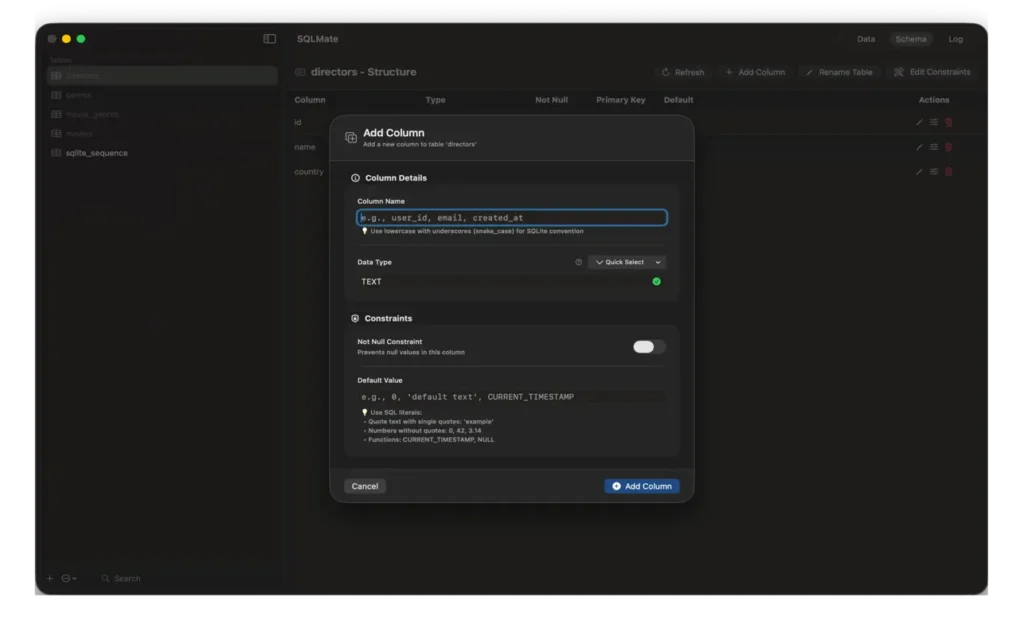
If you work primarily on macOS, SQLMate is, in my opinion, the most balanced and thoughtfully designed sqlite database browser available today.
Unlike cross-platform tools, SQLMate is built exclusively for macOS using SwiftUI. That matters more than people think. The interface feels native. Keyboard shortcuts like ⌘N, ⌘O, and ⌘W work exactly as expected. Multiple windows behave like real Mac apps. Drag-and-drop just works.
But beyond UI polish, the workflow is where SQLMate shines.
Why SQLMate Stands Out
As a daily-use sqlite editor, it offers:
- Visual table browsing with advanced filtering
- Fast full-text search across all columns
- Sortable columns with visual indicators
- Pagination (50, 100, 500 rows) for large datasets
- Inline row editing with instant save
- Full NULL handling and support for TEXT, INTEGER, REAL, BLOB
Editing data doesn’t feel risky or clunky. It feels controlled and immediate – exactly what you need when debugging app state.
Schema management is equally strong. You can:
- Create tables with a column designer
- Modify columns and constraints
- Rename tables safely
- Manage indexes
- View primary keys, NOT NULL rules, and defaults
It behaves like a focused sqlite manager, not a general-purpose database suite.
Built by a Developer, for Developers
One thing that becomes obvious quickly: this tool was made by someone who actually debugs apps daily.
It uses direct SQLite3 C API access. There are no external dependencies. It opens databases from any SQLite-compatible app instantly. It handles complex queries without ceremony.
Privacy & Performance
- Fully offline
- No data leaves your Mac
- App Sandbox protection
- No tracking (optional analytics only)
Pricing
£3.99 one-time purchase.
No subscriptions. No feature gating.
Compared to subscription-based tools, that’s refreshingly developer-friendly.
If your primary need is managing SQLite on macOS, SQLMate is the most practical and efficient db browser for sqlite I’ve used.
2. DB Browser for SQLite – Popular Open-Source Option
This is often the first tool developers try. It’s free and open-source, which is a big plus.
However, from a workflow perspective, it feels dated. The UI isn’t native on macOS, filtering is basic, and handling large datasets can feel sluggish.
It works – but it doesn’t feel modern.
If budget is zero, it’s fine. But compared to a purpose-built sqlite browser, it lacks refinement.
3. SQLiteStudio – Feature-Rich but Heavy
SQLiteStudio positions itself as a complete sqlite studio environment. It supports triggers, views, advanced schema editing, and plugins.
The downside? It feels heavy and visually outdated. For quick inspection or editing during development, it can feel like overkill.
If you’re managing highly complex schemas with triggers and deep structure work, it may help – but for daily debugging, it’s slower than it should be.
4. TablePlus – Beautiful but Subscription-Based
TablePlus is a polished multi-database sqlite gui among many other database engines.
The interface is clean and modern. Query execution is fast. Autocomplete is strong.
However, it’s not SQLite-focused. It’s a general database tool. That means the workflow is optimized for many engines, not specifically for SQLite.
Also, pricing is subscription-based in most tiers, which becomes expensive long term compared to a one-time £4.99 license.
5. DBeaver – Enterprise-Grade but Complex
DBeaver is powerful. Extremely powerful.
But it’s also heavy. Startup time, configuration options, and workspace management make it feel like an enterprise IDE rather than a lightweight sqlite viewer.
If you manage multiple database systems daily, it’s useful. If you just need to inspect an app’s local SQLite file, it’s excessive.
6. LiteCLI – Terminal-Based SQLite Client
If you prefer CLI tools, LiteCLI offers autocomplete and syntax highlighting in the terminal.
It’s fast and developer-friendly – but it’s not a visual sqlite database browser. There’s no grid editing or schema designer.
Great for command-line purists. Not ideal for visual data debugging.
7. Datasette – Web-Based SQLite Viewer
Datasette turns SQLite databases into web applications.
It’s excellent for publishing datasets or sharing structured data, but it’s not meant for editing or schema modification. It’s more of a read-only sqlite viewer for data exploration.
8. Beekeeper Studio – Modern but General-Purpose
Beekeeper Studio has a clean interface and supports multiple databases.
Like TablePlus, it’s not SQLite-focused. It works as a sqlite client, but its optimization lies elsewhere.
9. Valentina Studio – Powerful but Overbuilt
Valentina Studio offers extensive features and supports multiple engines.
However, the UI complexity and licensing tiers can feel overwhelming if your primary task is SQLite database inspection.
10. SQLite CLI (Official Tool)
The official SQLite command-line interface is always reliable.
But it’s not a sqlite editor in the visual sense. No inline editing, no table browsing, no filters. It’s raw SQL only.
For migrations and scripting, it’s perfect. For daily inspection? Limited.
How to Choose the Right SQLite Database Browser
When selecting a sqlite db browser, ask yourself:
- Is it optimized specifically for SQLite?
- Does it feel native to your operating system?
- Is editing safe and intuitive?
- Can it handle large datasets smoothly?
- Is pricing sustainable long-term?
For macOS developers, specialization matters. A tool that does one thing extremely well often beats a universal database IDE.
Why SQLMate Wins for macOS Developers
After years of switching between tools, I value:
- Speed
- Native UX
- Focused feature set
- No subscription
- Direct database access
- Clean schema management
SQLMate combines all of these in a lightweight sqlite manager built specifically for everyday programming.
It’s not trying to be everything. It’s trying to be the best sqlite browser for macOS – and it succeeds.
Frequently Asked Questions
What is the best sqlite browser for macOS?
For macOS users, a native application typically delivers the best experience. Tools built specifically for macOS provide smoother window management, proper keyboard shortcuts, and better file handling. Among current options, SQLMate stands out as a purpose-built sqlite browser optimized exclusively for macOS, offering strong performance and a clean developer workflow.
Is it better to use a dedicated sqlite client or a multi-database tool?
If you work primarily with SQLite, a focused sqlite client is usually more efficient. Multi-database tools like TablePlus or DBeaver support many engines, but that flexibility often adds complexity. A dedicated sqlite db browser is typically faster, lighter, and better aligned with SQLite-specific workflows.
Can these tools open iOS and macOS app databases?
Yes. Most modern sqlite database browser tools can open any standard SQLite file, including databases used by iOS and macOS applications. Tools optimized for Apple platforms, such as SQLMate, integrate especially well with local development workflows.
Do sqlite browsers support schema editing?
Most professional sqlite editor tools allow schema management. This typically includes creating tables, modifying columns, managing indexes, and editing constraints. However, the usability of these features varies significantly between lightweight tools and enterprise-grade database clients.
Are sqlite database browsers secure?
Desktop-based sqlite viewer applications generally work offline and operate directly on local files. Tools built with macOS security standards (such as App Sandbox protection) add an additional layer of file access control. Since SQLite is file-based, security largely depends on how the application manages local access.
Do I need a subscription for a professional sqlite manager?
Not necessarily. Some multi-database tools operate on subscription models, while others offer one-time licenses. For example, SQLMate is available as a one-time purchase (£4.99), which may be more cost-effective long term compared to recurring pricing.
Is SQLMate only for SQLite?
Yes. It is a focused sqlite client designed exclusively for SQLite databases.
Is SQLMate secure?
Yes. It works offline, uses App Sandbox protection, and keeps all data on your Mac.
Final Thoughts
SQLite is a critical part of modern development. Choosing the right sqlite database browser directly impacts debugging speed, development efficiency, and data safety.
There are many tools available – but if you’re a macOS developer looking for a clean, efficient, and affordable db browser for sqlite, SQLMate is the most practical choice in 2026.
Simple. Focused. Developer-first.